

Luma has been gaining momentum recently, especially in North America and the tech scene.
If you’ve spent any time in startup, tech, or community-led event spaces over the past couple of years, you’ve probably seen a Luma event page. The design feels clean, modern, and noticeably different from older ticketing platforms. There’s less friction, fewer steps, and an overall sense that the product was built with a very specific kind of organizer in mind.
In some circles, it’s become the default.
But what’s interesting is that this visibility hasn’t been matched by traditional review coverage. Unlike platforms like Eventbrite or TicketSource, Luma doesn’t have a deep footprint on sites like G2 or Capterra. There are relatively few structured reviews, star ratings, or side-by-side comparisons to rely on.
So instead of trying to summarise reviews that barely exist, it’s more useful to look at something else: how people are actually talking about Luma in the wild, how it behaves as a product, and what happens when you move beyond the surface-level experience.
Our aim in this article is to provide a transparent look at reviews and sentiment towards Luma as well as break down their pricing and features to help you understand whether or not is is the right fit for your event.
What Luma actually is (and why that distinction matters)
One of the reasons Luma can be difficult to evaluate is that it doesn’t fit neatly into the category of “ticketing platform.”
At a glance, it does all the expected things. You can create an event, sell tickets, manage attendees, and check people in on the day. But the structure of the product tells a slightly different story.
Luma is built around the idea of ongoing audiences rather than one-off transactions. Events sit inside calendars. Calendars can be followed and can be thought of as a Box Office if you’re used to that term. Communication, through email, notifications, and reminders, is embedded directly into the product. Attendees are not just buyers, they’re participants in something that can continue beyond a single event.
That design philosophy explains a lot of the platform’s strengths. It also explains many of its limitations.
Why Luma is getting so much attention
If you look at how Luma is discussed in Reddit threads, particularly in conversations about Eventbrite alternatives, the same themes come up again and again.
The first is simplicity.

People describe Luma as “pretty simple” which in the context of event tools, is a strong endorsement. Most ticketing platforms accumulate complexity over time. They add layers of configuration, rules, and edge cases. Luma does the opposite. It removes friction. It makes it easy to get something live quickly.
That ease of use is not accidental. It’s clearly a core design priority. And for a large group of organizers, especially those running informal or community-driven events, it’s exactly what they want.
The second theme is design.
Even when people don’t explicitly say it, the appeal is obvious. Luma event pages feel more like modern landing pages than traditional ticketing flows. They’re clean, minimal, and visually coherent in a way that many older platforms aren’t.
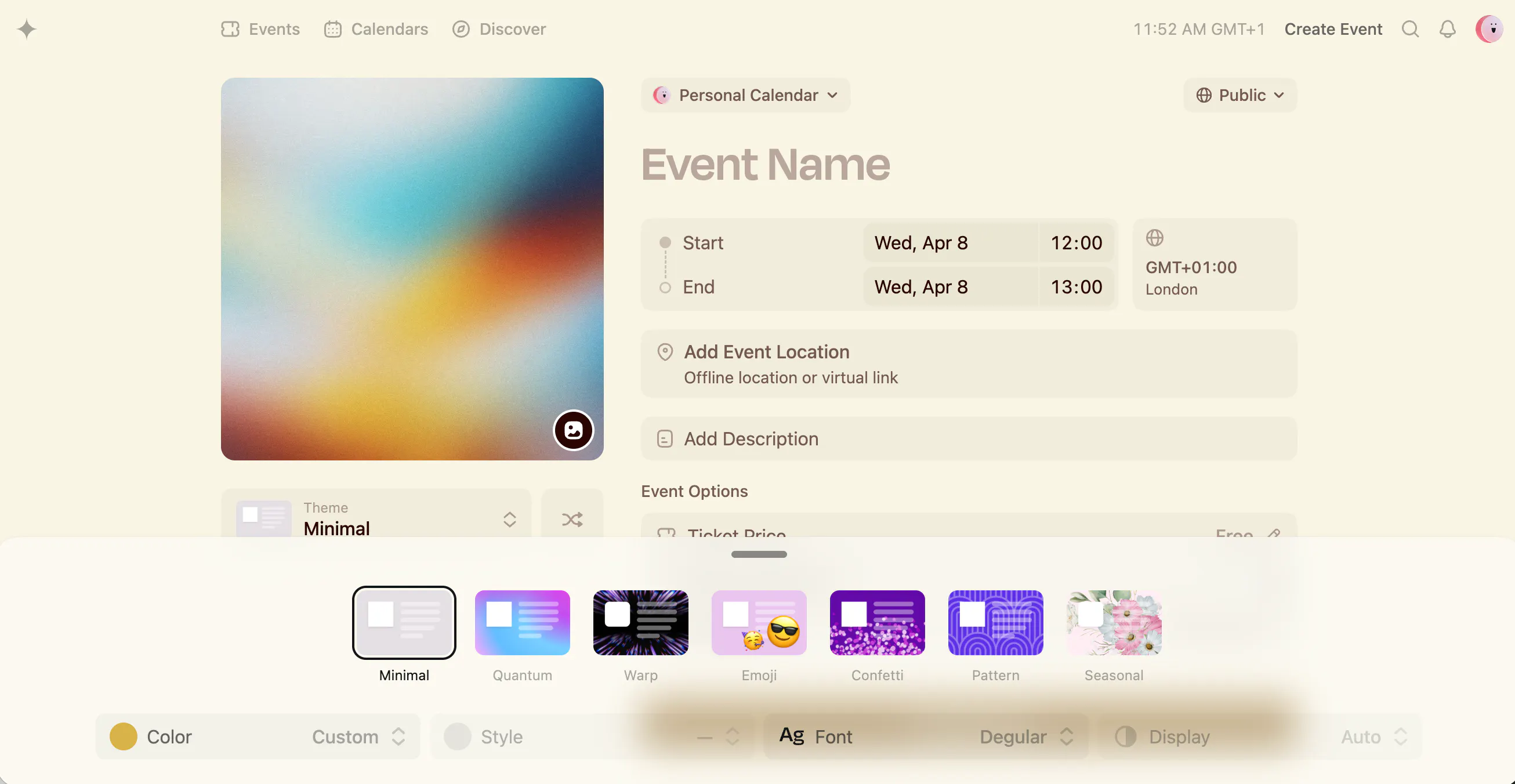
This matters more than it might seem. In communities where events are part of a broader identity, whether that’s a startup ecosystem, a creator audience, or a local network, the way an event is presented is part of the experience. Luma leans into that heavily, and it’s one of the main reasons it has spread so quickly in those environments.
The third theme is fit.
Across multiple Reddit discussions, Luma is consistently framed as a good option for smaller, community-led events. One user described it as “great for small community events,” which captures its sweet spot well. It works best when the organizer already has a sense of who their audience is, and when the event is as much about the people attending as it is about the content itself.
This is reinforced by some of the platform’s features. Approval-based attendance, visible guest lists, and referral-style invitations all make sense in a context where curation matters. They’re less obviously useful, and sometimes actively cumbersome, in larger, more operationally complex events.
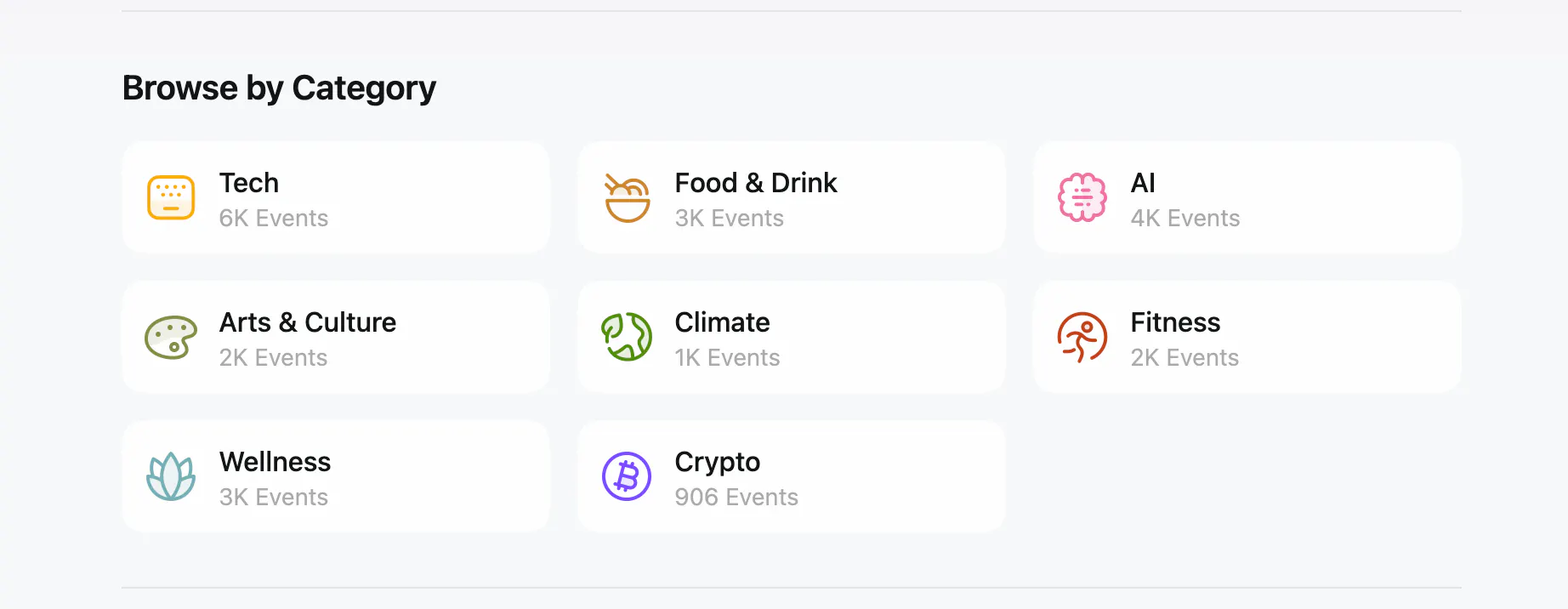
There’s also a strong signal in how widely Luma is used in certain circles. Even without formal reviews, you can see it appearing again and again in tech meetups, founder gatherings, and community calendars. Just take a look at the events they have listed and the category they fall in to:
And from an attendee perspective, the experience is clearly working. The Luma iOS app has an average rating of around 4.9 out of 5 from roughly 12,000.
Where that approach starts to break down
The same design decisions that make Luma appealing at first glance are also the ones that create friction as your needs evolve.
One of the clearest examples of this is pricing.
At a high level, Luma’s pricing appears straightforward. Free events are free. Paid events on the free plan incur a platform fee of around 5%, and there’s a paid tier that removes that fee for a monthly subscription. On paper, that’s easy to understand.
But when you look at real-world usage, the picture becomes more complicated.
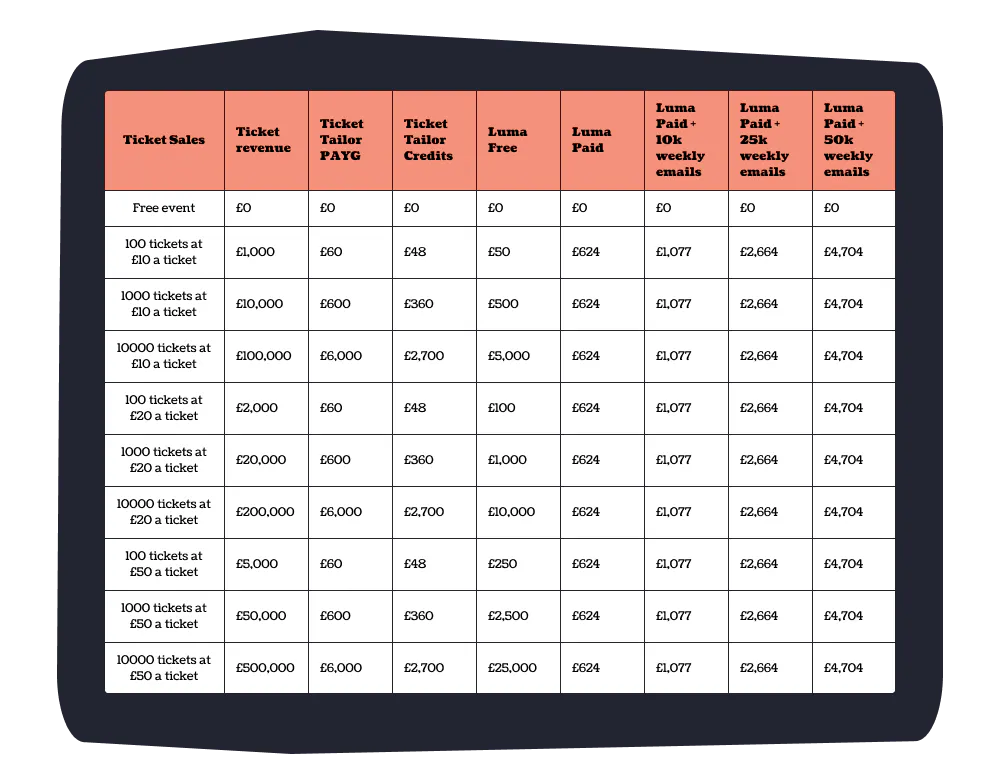
Based on our own pricing analysis , Luma is not necessarily the cheapest option even at relatively modest scale. At around £10,000 in ticket revenue, the free tier would cost roughly £500 in fees, compared to around £360 using Ticket Tailor’s credits model.
At higher volumes, the paid plan can make Luma look more competitive. Removing the platform fee flattens costs and, at first glance, makes the pricing feel more predictable.
But that’s only part of the story.
What isn’t immediately obvious is that Luma’s pricing is tied not just to ticket sales, but to communication.
Because messaging is built into the product, it becomes a core part of how events are run. Invitations, reminders, and follow-ups are all handled within the platform and are sent by default. In practice, that often means sending multiple messages per attendee.
Per attendee Luma has 3 default messages. At 2,850 attendees, that’s roughly 8,500 emails. At 6,000 attendees, it’s closer to 18,000, multiplied by how ever many events you have. Limits reset weekly so depending on timings and the emails you send, you could easily be moved into paying for the ability to communicate.
At that point, you’re likely to exceed the included messaging limits and move into paid tiers. When you factor those in, the cost difference between Luma and Ticket Tailor narrows significantly. In lots of cases, it disappears altogether.
This is an important distinction. Luma doesn’t just charge you to sell tickets. It charges you indirectly to communicate with your audience. And because communication is such a central part of the product, that cost is difficult to avoid.
The limits of simplicity
Another area where Luma’s design philosophy becomes more apparent is in its ticketing capabilities.
For straightforward events, the platform works well. You can create different ticket types, set prices, and manage registrations without much effort. For many organizers, that’s enough.
But as soon as you move into more complex territory, the gaps become harder to ignore.
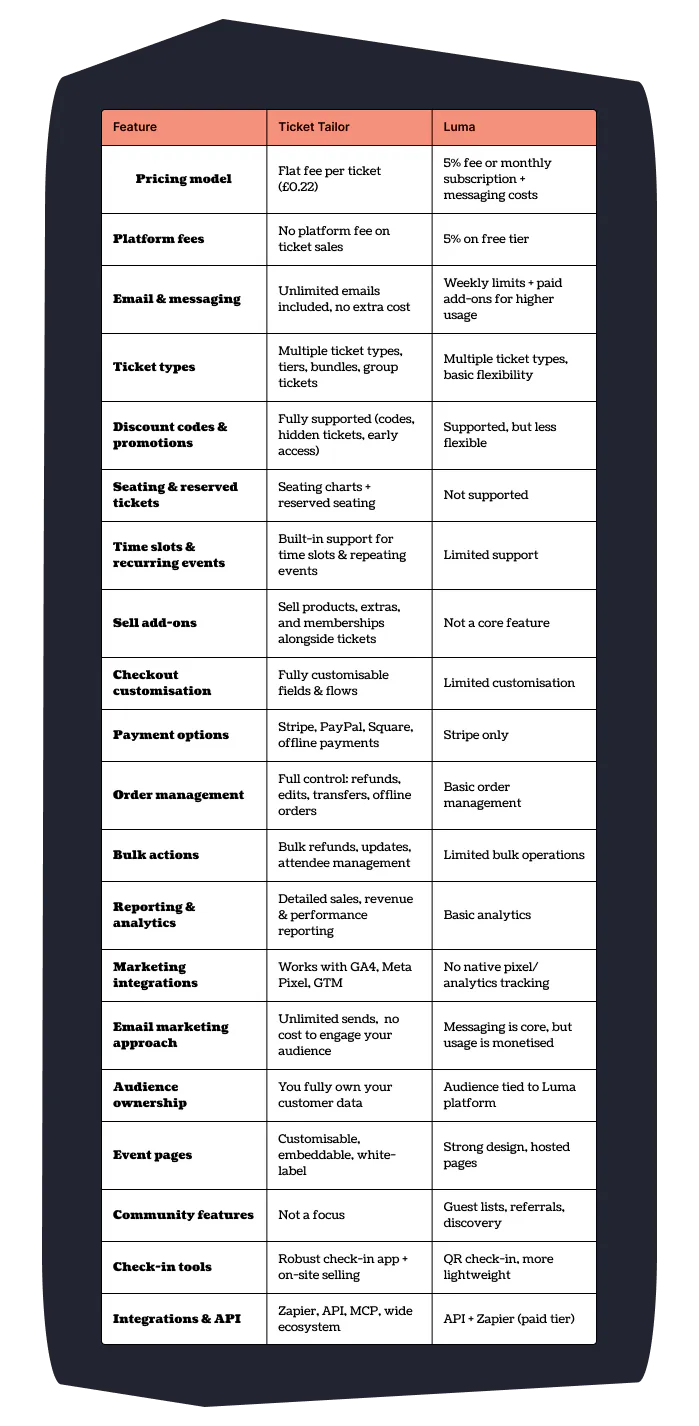
There’s no native support for seating charts or reserved seating. Ticket rules are relatively basic compared to more established platforms. Selling add-ons, memberships, or bundled products is not a core part of the experience.
None of these things matter if you’re running a casual meetup. They matter a great deal if you’re running a theater, a conference, or any event where structure and control are important.
This is where the difference between “simple” and “limited” starts to show.
Here’s a feature overview to help explain:
Marketing and control
The same pattern appears again when you look at marketing and tracking.
Because Luma is a fully hosted platform, you don’t have much control over the underlying environment. You can’t easily add tracking scripts, which makes it difficult to integrate with tools like Google Analytics 4 or Meta Pixel.
For organizers who rely on paid acquisition or want to understand how users move through their funnel, this is a meaningful limitation. It’s not that Luma doesn’t support growth, it does, but in a very specific way. It encourages growth within its own ecosystem, through referrals, community visibility, and built-in communication.
That works well if you’re operating inside those dynamics. It’s less helpful if you’re running campaigns across multiple channels and need full visibility into performance.
Scalability
Finally, there are some more subtle friction points that tend to emerge as events grow.
Features like approval-based attendance and curated guest lists are useful in small settings. They help maintain quality and create a sense of exclusivity. But they also introduce manual work.
In one Reddit discussion, a user noted that reviewing and managing attendees could become time-consuming, particularly when dealing with larger numbers of registrations. That kind of workflow is manageable at small scale. It becomes more challenging as volume increases.
This is a recurring theme with Luma. Many of its features are optimised for intimacy and control. They are less well suited to scale and automation.
How Ticket Tailor approaches things differently
Looking at Luma in isolation only tells part of the story. The contrast becomes clearer when you compare it to a platform built with a different set of priorities.
Ticket Tailor takes a more traditional, and in many ways more operational, approach.
Where Luma emphasises simplicity and community, Ticket Tailor emphasises flexibility and control. It supports seating charts and reserved seating. It allows you to sell products, memberships, and add-ons alongside tickets. It provides more advanced ticket rules, more detailed reporting, and greater control over how events are structured whilst still incorporating comparable features like event pages to host an event or broadcasts (which are free) to communicate with your attendees.
The pricing model reflects that difference as well.
Instead of charging based on messaging or platform fees, Ticket Tailor uses a flat per-ticket fee. That makes costs predictable from the outset. It also means there’s no penalty for communicating with your audience. You can send as many emails as you like without incurring additional charges.
From a marketing perspective, the platform is also more open. It integrates with tools like GA4 and Meta Pixel, making it easier to track performance and optimise campaigns.
None of this makes Ticket Tailor inherently “better.” But it does make it better suited to a different kind of organizer.
Choosing the right tool for your event
So where does that leave things?
Luma is an excellent choice if you value speed, simplicity, and design. It works particularly well for community-driven events where the audience is already engaged and the operational complexity is relatively low.
If you’re running meetups, founder gatherings, or small to mid-sized events where the experience matters more than the infrastructure, it’s easy to see why Luma has become so popular.
But if your needs are different, if you're running more frequent events, larger events, managing more complex ticketing structures, relying on marketing and analytics to drive growth or are looking to develop a wider ecosystem around your events through selling things like products or memberships, the limitations become more significant.
In those cases, a platform like Ticket Tailor is likely to be a better fit. Not because it’s simpler or more modern, but because it’s designed to handle complexity and scale in a way that Luma is not.
So what do we make about Luma reviews?
Luma’s rise makes sense.
It’s a product that feels aligned with how with the tech community it was built for.
But those strengths come with trade-offs.
The more your events start to resemble a business, with revenue targets, operational demands, and marketing considerations, the more those trade-offs matter.
Choosing the right platform isn’t about picking the one with the most hype or the cleanest interface. It’s about choosing the one that fits how you actually run your events, both now and as you grow.
And that’s where the difference between Luma and Ticket Tailor becomes most clear.